Support Library
Subdomain Discovery Playbook
A seven-phase playbook for listing every hostname under your domain and proving what each one is, using DNS Panopticon tools, the browser and dig, curl and openssl, so forgotten hosts get an owner or get removed.
The short answer
Subdomain discovery means building a complete list of the hostnames under your domain, then proving what each one is: does it resolve, who runs it, what answers on it, and does anyone still need it. Forgotten hosts are where most DNS-related incidents start, from subdomain takeovers to unpatched test servers.
This playbook works in seven phases: collect names, map them, validate DNS, rule out wildcards, attribute each host, check what is listening, then assess risk and clean up. Each phase lists what to do with DNS Panopticon tools, in the browser and on the command line. The screenshots use dnspanopticon.com, our own domain, and the Zone Analyzer sample zone.
Collecting public names is passive. Connecting to hosts, checking ports and probing services is active testing, so do it only on domains you own or have written permission to assess.
Before you start: a worksheet
| Column | What goes in it |
|---|---|
| Name | The full hostname, lowercase, without a trailing dot |
| Source | Where you found it: CT logs, zone export, MX record, a web page |
| DNS answer | A, AAAA or CNAME target, or NXDOMAIN, NODATA or SERVFAIL |
| Network and owner | The ASN and organization from IP WHOIS, and the team or vendor that owns it |
| Listening | Ports and the HTTP status or banner you saw |
| Status and action | Keep, fix, or remove, with a date |
A spreadsheet is enough. The point is that every name ends with an owner and a decision, not just a resolved address.
Phase 1: Collect names from every source
| Source | How | Blind spots |
|---|---|---|
| Certificate Transparency logs | crt.sh, or the Advanced scans in Website Recon and Domain Visualizer. The Certificate Transparency Hunting guide covers this in depth | Names covered only by a wildcard certificate, private CAs, hosts without TLS |
| Your zone export | Export the zone from your DNS provider and load it into Zone Analyzer; parsing happens in your browser | Delegated subzones and names hosted at another provider |
| Records that name other hosts | MX, NS, SRV and CNAME targets, SPF includes and DMARC report addresses; Domain Visualizer draws them | Only what the zone publishes |
| Common names | Domain Visualizer Advanced looks up common labels such as www, mail and autodiscover | Anything with an unusual name |
| Your own systems | CDN, cloud and SaaS consoles listing custom domains; ACME client configs; web server virtual hosts | Shadow IT that bypassed those systems |
| The web | Links in your pages, sitemap.xml, security.txt, search engines (site:example.com -www) and the Wayback Machine | Names nothing links to |
Two checks belong here because they decide how much of your zone outsiders can list without guessing:
| Check | Command | Good result |
|---|---|---|
| Zone transfer is refused | dig AXFR example.com @ns1.example.com | Transfer failed or REFUSED from each of your name servers |
| DNSSEC denial type | dig +dnssec doesnotexist.example.com A | NSEC3 records, or a provider that signs on the fly; plain NSEC chains can be walked to list every name |
Phase 2: Map what you found
Run a Domain Visualizer scan on the domain and switch to By Host. Each host in the zone becomes a branch, with its record types and answers to the right. The Advanced scan, on the paid plan, adds names from certificate logs and common-name lookups, and reports them in the Subdomain discovery panel.
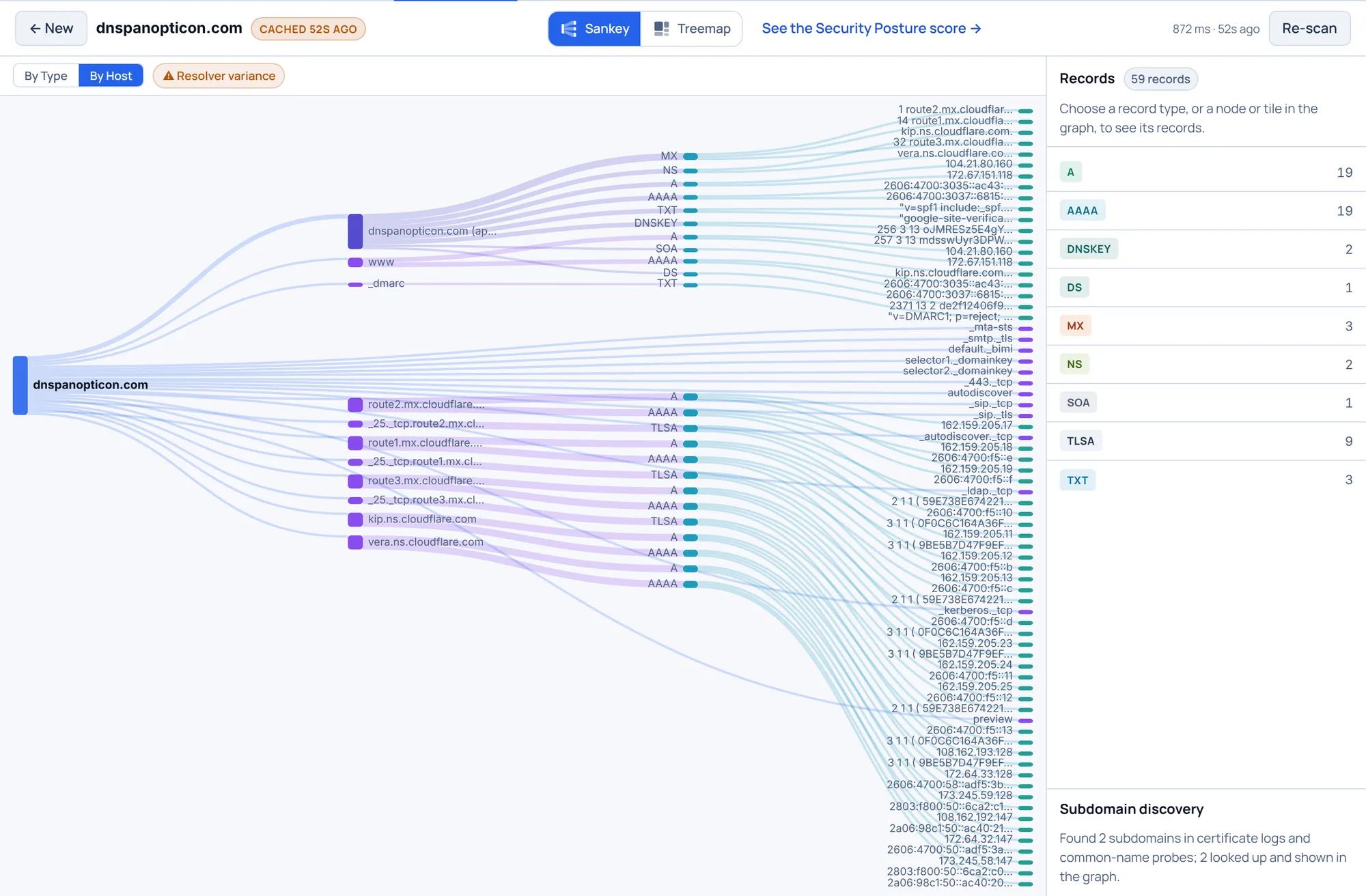
Things to look for in the graph:
- Hosts you did not list in Phase 1. Add them to the worksheet.
- Branches that end in a CNAME to another company's domain. Those are third-party services, and the ones to check for takeover in Phase 6.
- The discovery panel's counts. Each scan has a limit on outbound lookups. When a domain has more names than the limit allows, the panel lists the ones that were not looked up, so you can check them yourself in Phase 3.
Phase 3: Validate each name in DNS
A name in a certificate or a spreadsheet proves nothing about today. Resolve every one, from a public resolver and from your authoritative servers, and record the status as well as the answer.
| Task | Command | What it tells you |
|---|---|---|
| Addresses, both families | dig +noall +comments +answer www.example.com A www.example.com AAAA | status: NOERROR with answers, NOERROR with none (NODATA), NXDOMAIN or SERVFAIL |
| Follow a CNAME chain | dig +noall +answer shop.example.com CNAME | The target name; resolve that too, all the way to an address |
| Ask the authoritative server | dig +norecurse www.example.com A @ns1.example.com | What your zone says, without resolver caching |
| Resolve a list of names | while read h; do dig +short "$h" A; done < names.txt | Quick pass over a crt.sh export |
| Same on Windows | Resolve-DnsName www.example.com -Type A_AAAA | Name, Type and IPAddress; errors mean NXDOMAIN or failure |
| Result | What it usually means | Next step |
|---|---|---|
| Resolves to your own addresses | Live, expected host | Attribute and check it (Phases 5 and 6) |
| CNAME to a third-party service | Hosted by a vendor | Confirm the vendor resource still exists and is yours |
| NXDOMAIN | The name does not exist in the zone | Usually retired. Remove it from inventories, but keep watching CT for it |
| NOERROR with no address (NODATA) | The name exists with other record types, or as an empty non-terminal | Check other types (TXT, MX, CNAME) before calling it unused |
| SERVFAIL or timeout | A resolution failure, often DNSSEC or a broken delegation | See DNS SERVFAIL Explained; do not treat as absent |
| Private address (10/8, 172.16/12, 192.168/16) | Internal name published in public DNS | Move it to internal DNS |
Phase 4: Rule out wildcard DNS
A wildcard record (*.example.com) answers for every name, including ones that were never created. If you skip this check, every guessed name looks live and your list fills with false positives.
| Task | Command | What it means |
|---|---|---|
| Query a random label | dig +short qz7x1-not-a-host.example.com A | Any answer means a wildcard exists at that level |
| Check one level deeper | dig +short qz7x1.dev.example.com A | Wildcards can exist under subdomains too |
| Same on Windows | Resolve-DnsName qz7x1-not-a-host.example.com | An address instead of a name error |
Domain Visualizer Advanced and the Security Posture Attack Surface card run this check for you. When a wildcard exists, compare each discovered name's answer with the wildcard's answer: a name that returns the same address may not really exist. Wildcard DNS Risks covers why wildcards are risky in their own right.
Phase 5: Find out who runs each host
An address is not an owner. Look up who holds the network and who announces it, then match that with your providers. The IP WHOIS Lookup asks the regional registry that holds the address and shows the organization, network range, origin AS and abuse contact.
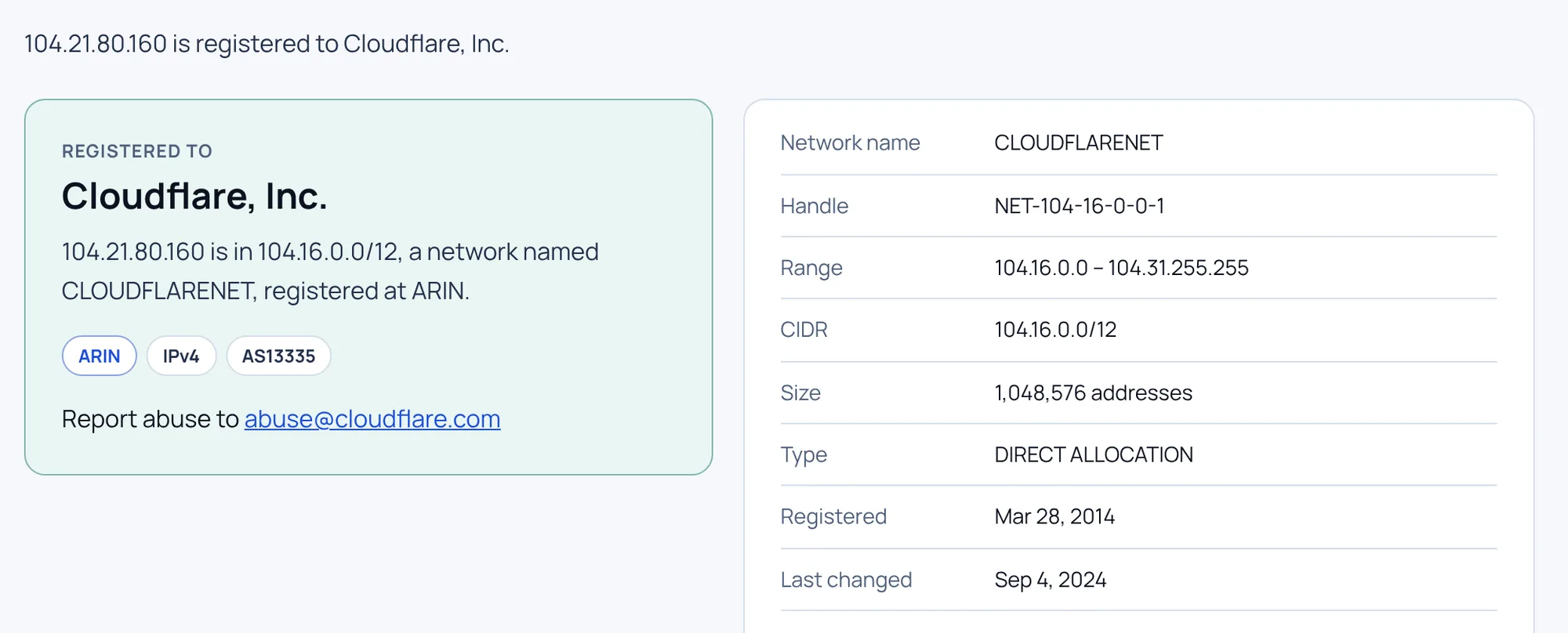
| Question | DNS Panopticon | Command line |
|---|---|---|
| Which organization holds the address? | IP WHOIS Lookup | whois 192.0.2.10 |
| Which network announces it? | ASN Lookup | dig +short TXT 10.2.0.192.origin.asn.cymru.com |
| What is the reverse DNS name? | ASN Lookup shows it for an address | dig +short -x 192.0.2.10 |
| Who hosts the site, and through which CDN? | Website Recon Hosting & Delivery card | curl -sI https://www.example.com/ |
| Who is the registrar for a third-party domain in a CNAME? | Website Recon Registration & Domain Lifecycle card | whois example.net |
Expect CDNs to hide the origin: the address belongs to the CDN, not to whoever runs the site behind it. For those hosts, find the owner from your CDN configuration instead. An address in a cloud provider's range that nobody can match to an account is a serious finding: it may have been released and reassigned to someone else.
Phase 6: Check what is listening
For each live host, confirm what actually answers. Start with HTTPS, since that is what most names are for, then check any other ports you expect.
| Task | Command | What to look for |
|---|---|---|
| HTTP status and server headers | curl -sI https://staging.example.com/ | The status code, Server and redirect Location; a 404 page from a hosting platform is a takeover warning sign |
| Follow redirects to the end | curl -sIL https://staging.example.com/ | grep -iE "^(HTTP|location)" | Where the name really ends up |
| Certificate on that host | openssl s_client -connect staging.example.com:443 -servername staging.example.com </dev/null 2>/dev/null | openssl x509 -noout -subject -issuer -dates | A certificate for a different name means the host is shared or misrouted |
| One TCP port, macOS and Linux | nc -vz staging.example.com 22 | succeeded, refused or a timeout |
| One TCP port, Windows | Test-NetConnection staging.example.com -Port 22 | TcpTestSucceeded True or False |
The TCP Port Check runs the same test from Cloudflare's network, which tells you what the internet sees rather than what your office network sees. It cannot test addresses on Cloudflare's own network, so for proxied hosts use the commands above. Ping and Traceroute from several locations help when a host answers from some places and not others.
Phase 7: Assess the risk and clean up
Security Posture's Attack Surface card, available with the paid plan, grades what discovery found. It flags the four patterns that turn a forgotten name into a real problem.
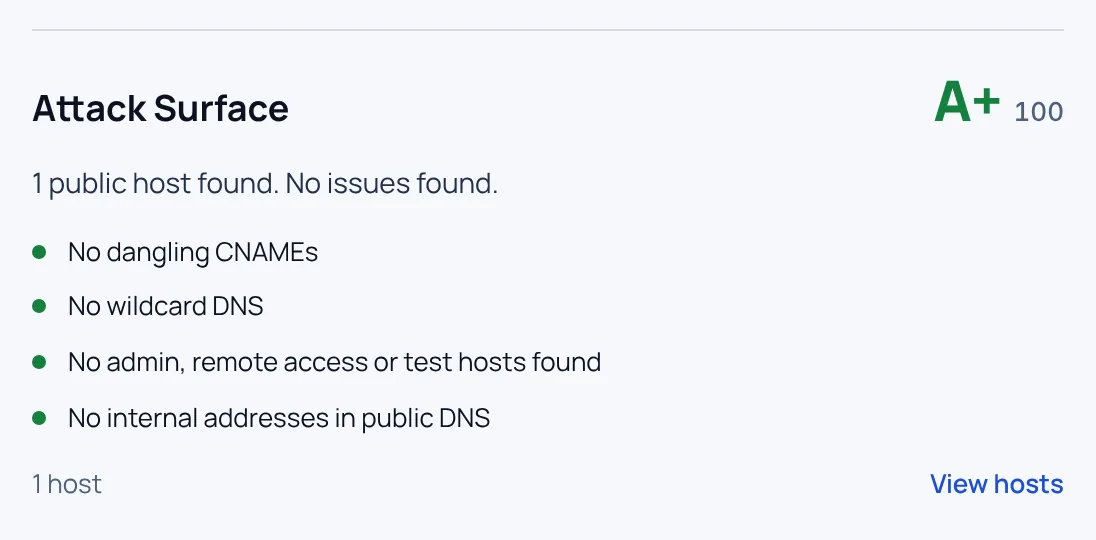
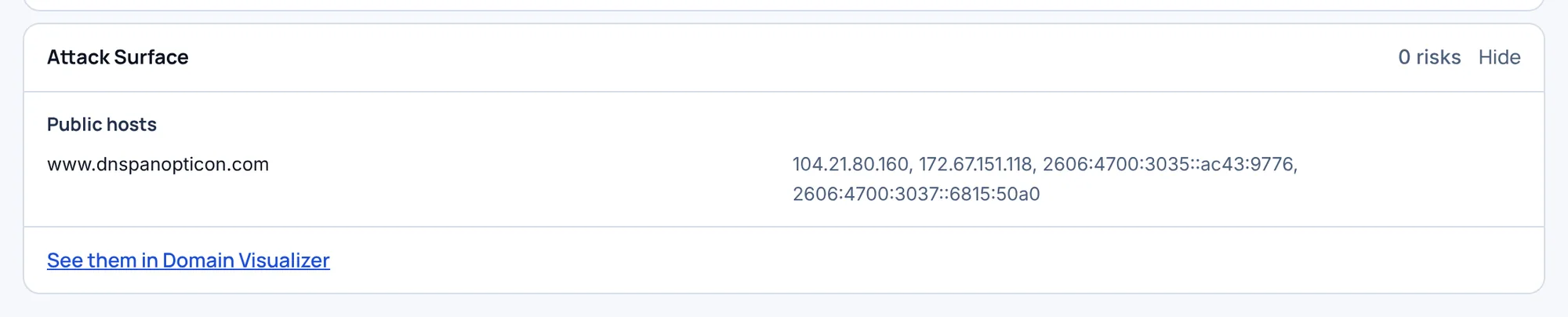
| Finding | Why it matters | Fix |
|---|---|---|
| Dangling CNAME | The target service no longer exists, so someone else may be able to claim it and serve content on your name | Remove the record, or reclaim the resource. See Subdomain Takeover Attacks |
| Wildcard DNS | Every name resolves, which hides typos and helps phishing | Replace with explicit records where you can. See Wildcard DNS Risks |
| Admin, remote access or test hosts | Names such as admin, vpn, rdp, dev and staging are first on every attacker's list | Put them behind access controls or remove them from public DNS |
| Internal addresses in public DNS | Reveals internal layout and breaks for outside users | Serve them from internal DNS only. See NAT and Private IP Address Ranges |
For a zone you control, Zone Analyzer finds the third-party CNAMEs in one step. Load your export (or try the sample) and select Vendor CNAMEs: it filters to CNAME records whose target is outside your own domain, which is exactly the list to confirm with each vendor.
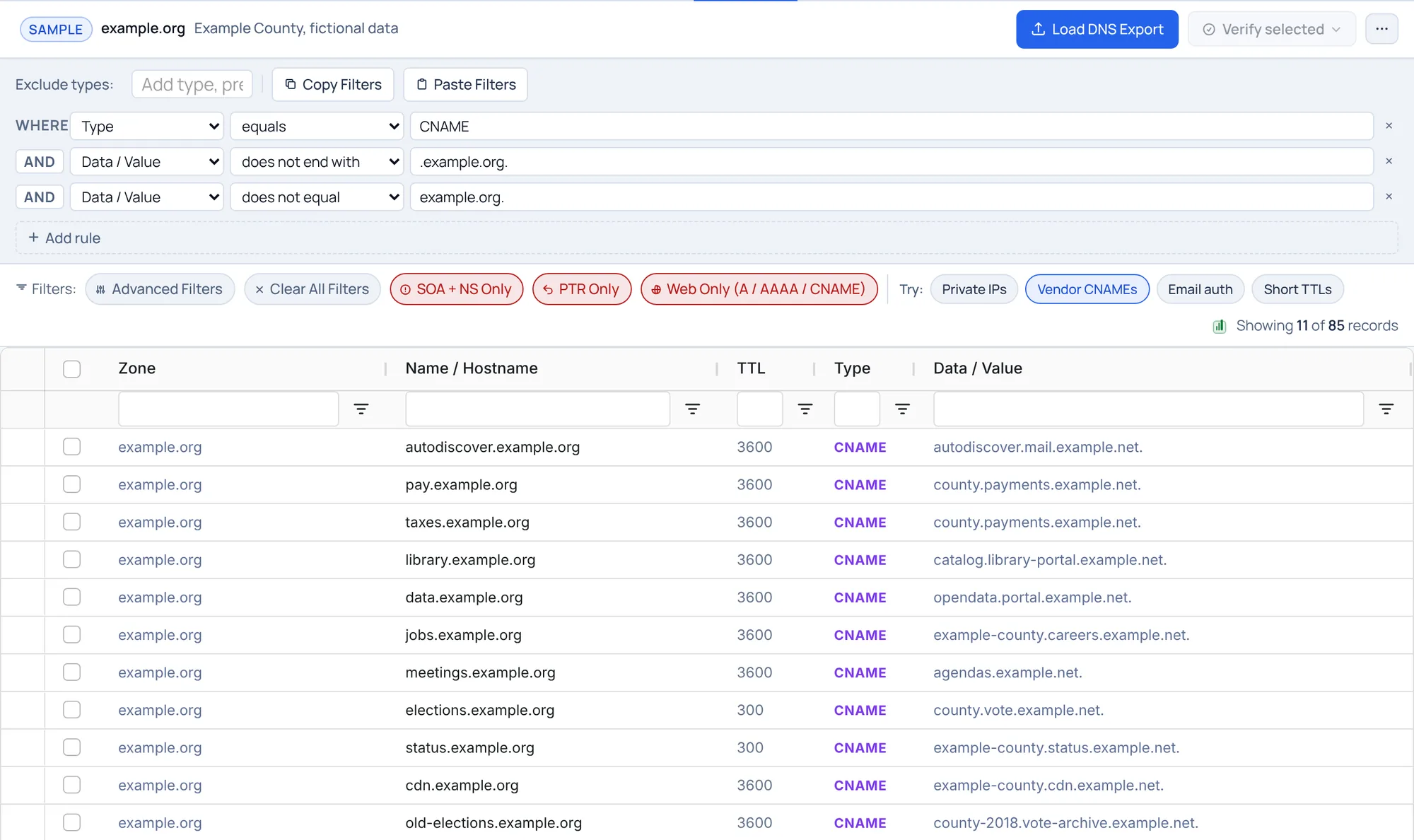
When you remove something, do it in this order: delete the DNS record first, wait at least the record's old TTL so resolvers drop their cached copies, and only then release the cloud or SaaS resource. Releasing it first, or too soon, leaves a window in which the name (or a cached answer for it) points at a resource anyone can create. Then rerun the scans and update the worksheet.
Keep it current
| When | What to run |
|---|---|
| Every new certificate alert | Phase 3 for that name, then match it with an owner |
| Monthly | Phases 1 to 4 and the Attack Surface card; compare with last month's worksheet |
| Each time a service is retired | Remove DNS first, wait out the old TTL, then release the resource; check CT and the zone a week later |
| Each time a vendor is added | Record the CNAME and its owner, and add the vendor's CA to CAA |
FAQ
Is subdomain discovery legal?
Collecting names from public sources such as CT logs, DNS and search engines is passive and generally fine. Connecting to the hosts, scanning ports or testing services is active testing, which you should only do on domains you own or have written permission to assess.
Why does a name from CT logs not resolve?
Certificates outlive the services they were issued for. If the name returns NXDOMAIN it was most likely removed from DNS. Check that it does not exist at another provider or under a delegated subzone before crossing it off.
How do I find subdomains that never had a certificate?
Use your zone export, the records that point at other hosts, your providers' consoles and server configurations. CT only covers names that appeared in publicly trusted certificates, so it is one source among several, not the whole list.
Sources and further reading
- RFC 9499: DNS Terminology
- RFC 2308: Negative Caching of DNS Queries (NXDOMAIN and NODATA)
- RFC 4592: The Role of Wildcards in the Domain Name System
- RFC 5936: DNS Zone Transfer Protocol (AXFR)
- RFC 5155: DNSSEC Hashed Authenticated Denial of Existence (NSEC3)
- OWASP Web Security Testing Guide: Test for Subdomain Takeover
- Microsoft Learn: Prevent dangling DNS entries and avoid subdomain takeover
- can-i-take-over-xyz: which services are vulnerable to takeover
- BIND 9 manual pages (dig)
- Microsoft Learn: Resolve-DnsName
- RFC 6962: Certificate Transparency